WhatsApp Business API is transforming how modern businesses communicate with customers. From startups and SMEs to large enterprises, companies are increasingly adopting the WhatsApp Business API to automate support, boost sales, and improve customer engagement. With billions of active users worldwide, WhatsApp has become one of the most effective channels for conversational commerce and business messaging.
Unlike traditional communication methods such as emails and SMS, the WhatsApp Business API allows businesses to deliver real-time conversations, personalized notifications, marketing campaigns, and automated customer support directly on WhatsApp. Whether you run an eCommerce store, healthcare business, travel company, or financial service, the WhatsApp Business API helps streamline customer interactions at scale.
In this detailed guide, you’ll learn everything about the WhatsApp Business API, including its features, pricing, setup process, benefits, use cases, and how businesses can leverage WhatsApp automation for growth.
What is WhatsApp Business API?
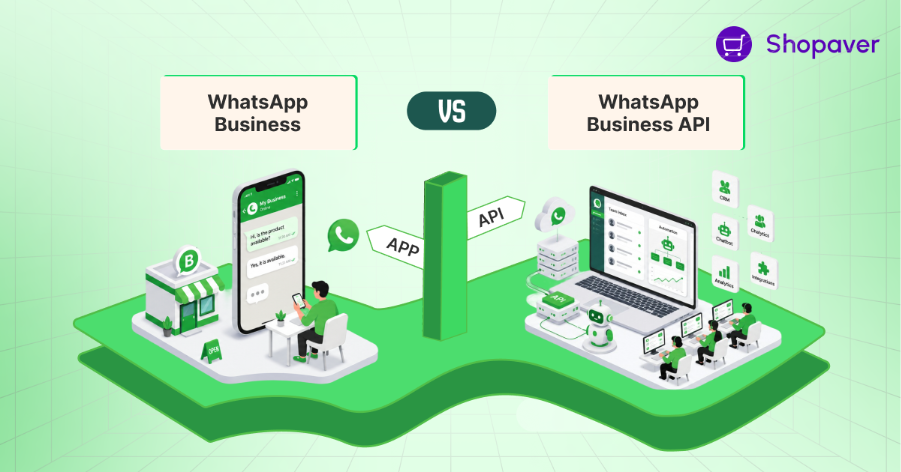
The WhatsApp Business API is an official messaging solution developed by Meta that enables medium and large businesses to communicate with customers on WhatsApp at scale. Unlike the standard WhatsApp Business App, the WhatsApp Business API is built for automation, integrations, multi-user communication, and enterprise-level messaging.
Businesses use the WhatsApp Business API for:
- Customer support
- Marketing campaigns
- Order updates
- OTP authentication
- Lead generation
- WhatsApp chatbot automation
- Notifications and reminders
The WhatsApp Business API works by integrating with CRM systems, customer support software, eCommerce platforms, and chatbot tools. This allows businesses to automate communication and manage conversations efficiently.
Another major advantage of the WhatsApp Business API is scalability. Businesses can handle thousands of customer conversations simultaneously without compromising customer experience.
Comparison Between WhatsApp Business App & WhatsApp Business API
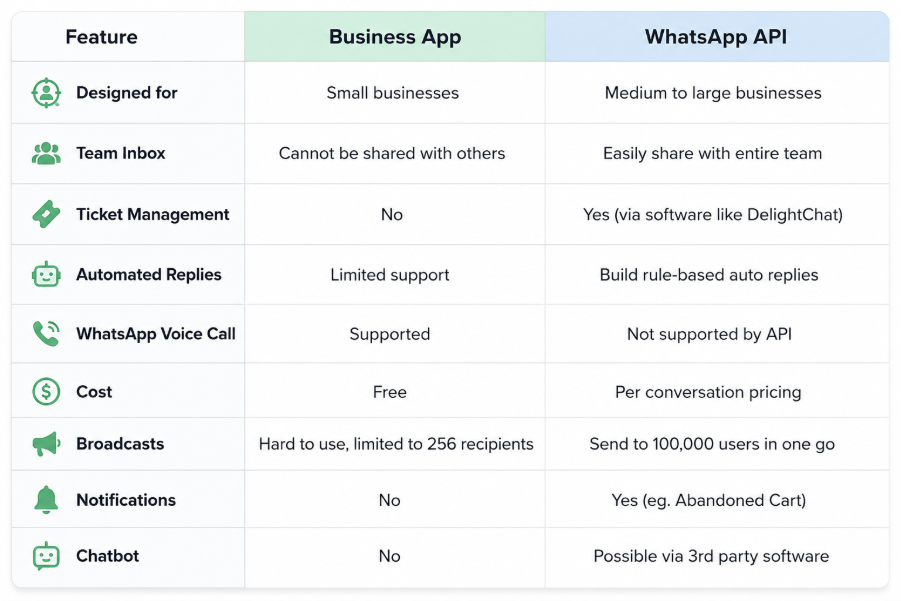
The WhatsApp Business API is ideal for businesses looking to automate customer communication and improve operational efficiency.
Key Features of WhatsApp Business API
Shared Team Inbox
The WhatsApp Business API allows multiple agents to manage conversations simultaneously from one dashboard.
Automated Messaging
Businesses can automate:
- Welcome messages
- Order updates
- Appointment reminders
- Payment alerts
WhatsApp Chatbot API
Using the WhatsApp Business API, businesses can deploy AI-powered chatbots to automate customer support and lead qualification.
CRM Integration
The WhatsApp Business API integrates with:
- Salesforce
- HubSpot
- Zoho CRM
- Shopify
- Custom CRMs
Bulk Messaging & Campaigns
Businesses can send:
- Promotional offers
- Festival campaigns
- Product launch announcements
- Customer engagement messages
Rich Media Support
The WhatsApp Business API supports:
- Images
- Videos
- PDFs
- Product catalogs
- Voice notes
Advanced Analytics
Track:
- Delivery rates
- Open rates
- Customer engagement
- Campaign performance
How to Send Messages Using WhatsApp Business API
Step 1: Create a Meta Business Account
To use the WhatsApp Business API, businesses must create a Meta Business Manager account.
Step 2: Complete Business Verification
Submit:
- GST certificate
- Business registration
- Official website
- Privacy policy
Step 3: Register Your Phone Number
Use a dedicated number for your WhatsApp Business API account.
Step 4: Choose an Official WhatsApp Provider
Partnering with an official BSP simplifies onboarding and integration.
Step 5: Create Message Templates
Template categories include:
- Marketing templates
- Utility templates
- Authentication templates
Step 6: Integrate the API
Businesses can integrate the WhatsApp message API with websites, apps, and CRM systems.
Step 7: Start Messaging
You can send:
- Session messages
- Template messages
- Automated notifications
What is WhatsApp Business API Pricing?
The WhatsApp Business API pricing model is conversation-based. Meta charges businesses based on the type and volume of conversations.
Conversation Type vs Purpose
- Marketing: Promotions, offers, and campaigns
- Utility: Order updates and transactional notifications
- Authentication: OTPs and verification codes
- Service: Customer support and queries handling
WhatsApp Cloud API Pricing
The WhatsApp cloud API pricing varies depending on:
- Country
- Message category
- Conversation volume
BSP Charges
Businesses may also pay:
- Monthly platform fees
- Setup fees
- Chatbot automation costs
- Integration charges
Benefits of Choosing an Official WhatsApp Provider
Choosing an official provider for the WhatsApp Business API offers:
- Faster approval
- Secure infrastructure
- Reliable delivery
- Easy integrations
- Technical support
- Advanced analytics
- Compliance with Meta policies
Businesses should avoid unofficial APIs as they may lead to account bans and security issues.
Use Case Scenarios of WhatsApp API
1. eCommerce
Businesses use the WhatsApp Business API for:
- Cart recovery
- Order confirmations
- Delivery updates
- Promotional campaigns
2. Healthcare
Hospitals send:
- Appointment reminders
- Prescription alerts
- Patient support messages
3. Banking & Finance
Financial institutions use the WhatsApp Business API for:
- OTP authentication
- Transaction alerts
- Payment reminders
4. Education
Educational institutes send:
- Admission updates
- Fee reminders
- Class notifications
Best Practices for Using WhatsApp Business API
- Always get customer opt-ins
- Avoid spam messaging
- Use approved templates
- Personalize conversations
- Track analytics regularly
- Follow Meta guidelines
Common Challenges & Solutions
1. Why do WhatsApp message templates get rejected?
Message templates are usually rejected when they contain promotional spam, unclear language, or violate Meta’s policies. Businesses should follow WhatsApp template guidelines carefully and use professional, customer-friendly content.
2. Why are messaging limits applied on WhatsApp Business API?
Messaging limits are applied when businesses have low-quality engagement, spam complaints, or poor response rates. Sending relevant messages only to opted-in customers helps improve messaging quality and limits.
3. Why do businesses face compliance issues with WhatsApp API?
Compliance issues often happen when businesses use unofficial APIs or send messages without customer consent. Using official WhatsApp APIs and following Meta’s policies can prevent account restrictions.
4. Why is WhatsApp API integration sometimes difficult?
API integration may become challenging due to technical setup, CRM compatibility, or webhook configuration issues. Choosing a reliable Business Solution Provider (BSP) can simplify the integration process.
5. Why do some businesses experience low customer engagement on WhatsApp?
Low engagement usually occurs because of excessive promotional messaging or lack of personalization. Businesses should focus on relevant, personalized, and value-driven communication to improve customer interaction.
The WhatsApp Business API is one of the most powerful tools for modern customer communication, WhatsApp marketing, automation, and conversational commerce. From customer support and lead generation to bulk messaging and chatbot automation, the WhatsApp Business API helps businesses improve engagement and increase sales efficiently.
Whether you are a startup, SME, D2C brand, or enterprise, adopting the WhatsApp Business API can significantly enhance your customer experience and business growth.
Get started with an official WhatsApp Business API provider today and transform your customer communication.
FAQs
1. What is WhatsApp Business API?
The WhatsApp Business API is Meta’s official messaging solution that enables businesses to automate and scale customer communication on WhatsApp.
2. Is WhatsApp Business API free?
No. Businesses pay conversation-based charges along with possible BSP platform fees.
3. What is WhatsApp Cloud API?
The WhatsApp Cloud API is Meta’s cloud-hosted version of the WhatsApp API that offers easier setup, scalability, and lower infrastructure maintenance.

Narendra Kumar is a skilled content writer crafting engaging and insightful content.